A CRM is not reserved for teams. For a freelancer it is where you find who said what, who owes how much and what the next action is. SoloGestion keeps it deliberately simple.
CRM
Your leads, clients and projects, linked to your invoices.
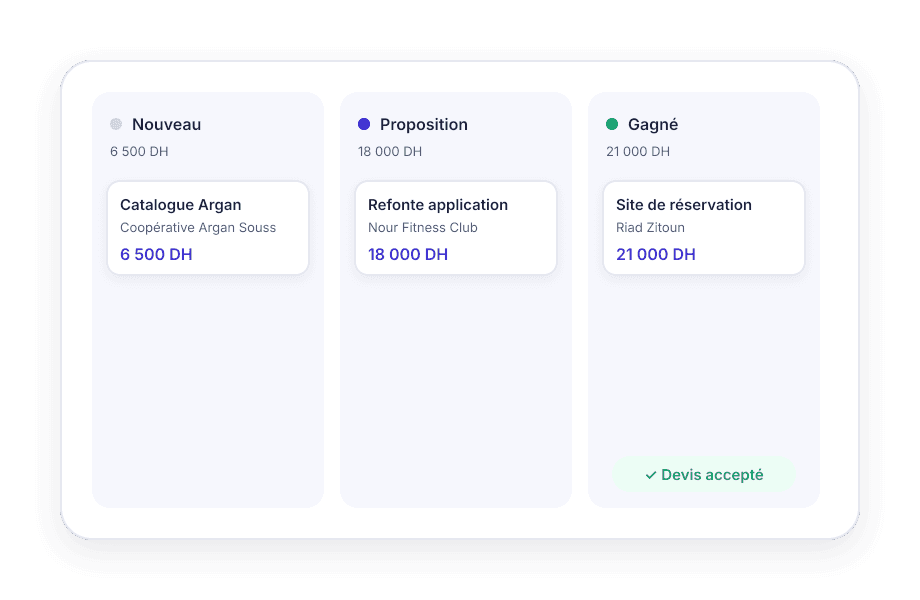
A CRM that does not require a sales team: a pipeline of opportunities, a card per client with what they owe, projects with their tasks and profitability.
- 15-day free trial
- No credit card
- French and English
The problem
The freelancer handles everything, so nothing is filed
Leads are in WhatsApp, clients in the phone, projects in your head, invoices in a folder. The link between the four lives in memory.
- 01
Opportunities get forgotten
A quote sent three weeks ago with no answer is often a follow-up that never happened.
- 02
You do not know what a client brings
How much invoiced, collected, still due: five documents to open to answer.
- 03
Projects drift silently
Without a budget or time tracking, a 25,000 MAD project can cost 30,000 in hours.
What SoloGestion does
SoloGestion’s CRM, designed for one person
Everything is linked: a lead becomes a client, a quote becomes a project, a project produces invoices.
A pipeline of opportunities
New, contacted, proposal, won, lost. Drag the cards, see the amount in progress and the next action.
A complete client card
Contact details, ICE, documents, payments, projects, history. And at the top: invoiced, collected, balance due.
Projects, tasks and time
Budget, kanban tasks, a timer per task, attached expenses. The project margin reads without a calculator.
In figures
- 5 stages
- in the pipeline, from first contact to won quote
- Balance due
- shown on every client card, deposits deducted
- Kanban
- tasks with a timer and time spent per project
- CSV
- import your clients from Excel or your previous tool
Frequently asked
Freelance CRM
Yes, from a CSV exported from Excel, Google Sheets or your previous software. A template file is provided and duplicates are skipped.
Yes. You create an invoice from a project and it stays attached. The project shows invoiced, collected, expenses and margin.
Yes, with read-only access to documents, payments, expenses, taxes and exports. They do not see your leads or tasks.
Your next invoice will be the easiest you've ever made
Create your account in two minutes. 15-day free trial, no credit card.
Create my accountNo credit card. No commitment.